

Many to one
A record from another table is assigned to the record. Several records can point to the same related record, so this is a many to one relation.app/Models/Product.php
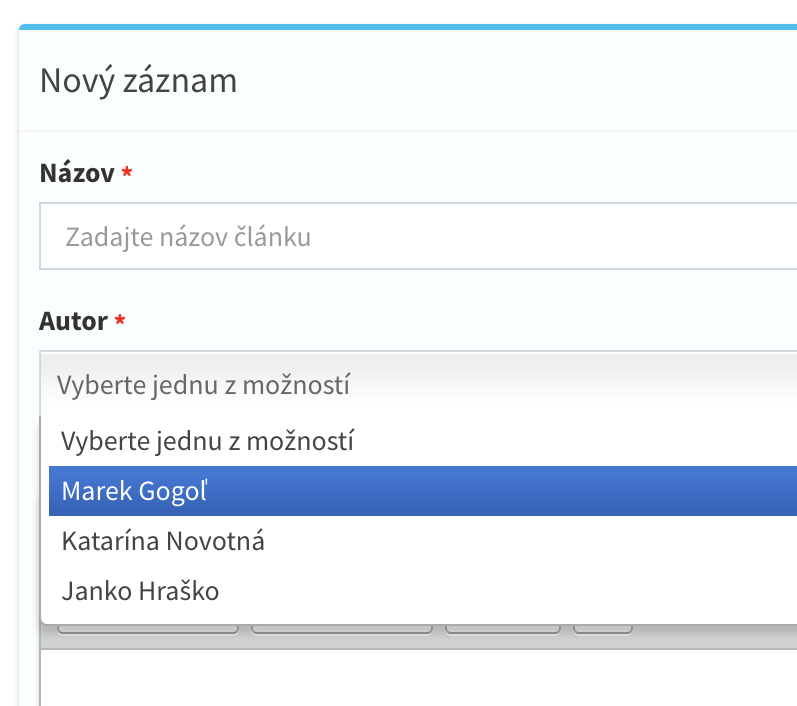
What CrudAdmin does with the field:
- A key without the
_idsuffix is renamed,categoryis stored in thecategory_idcolumn and read as$product->category_id. The relation method keeps the short name,$product->category. - The migration creates an
unsigned integercolumn with a foreign key to the related table. The column is nullable unless the field isrequired. - The field is rendered as a select. Options are loaded from the related admin model with the permissions of the logged administrator.
- Fields pointing to the same table load the options only once, with the columns of all their labels.
- An empty value of an optional relation is stored as
NULL. - Rows are searchable by the label columns of the related record. Searching in the relation column itself compares the id.
- Deleting a record used in a relation shows a warning with the list of modules and ids using it. The administrator can still confirm the deletion.
'parent' => 'name:Parent category|belongsTo:categories,name' in the Category model.
Many to many
app/Models/Admin.php
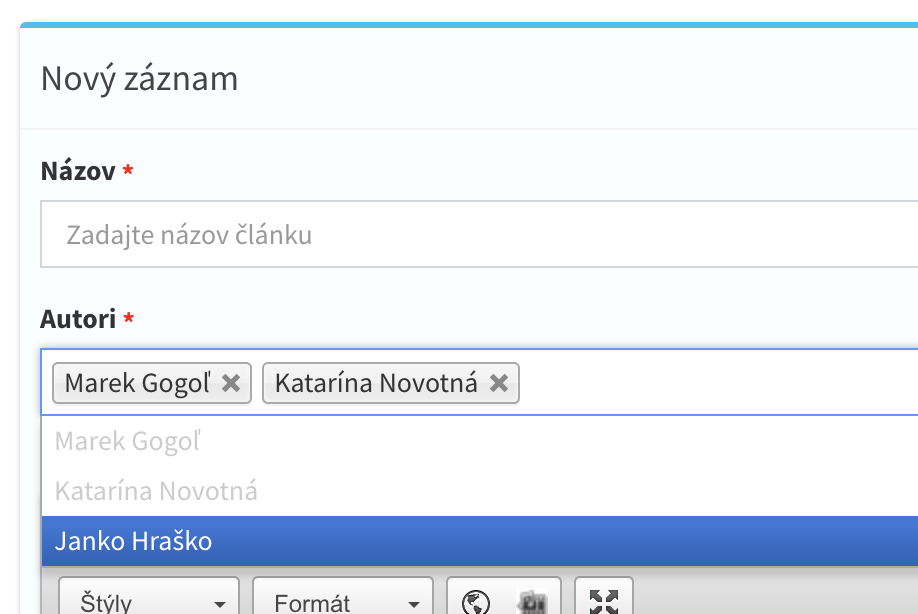
- No column is created in the model table. CrudAdmin creates a pivot table with an
idcolumn and two foreign keys,{owner in singular}_idand{related table in singular}_id. - The default pivot table name is
{related table in singular}_{model in singular}_{field key}, e.g.warehouse_admin_warehouses. The model part is derived from the class name, not from$table. - The third value sets your own pivot table name,
belongsToMany:clients_groups,name,admin_client_groups. - A relation to the own table names the second pivot column with an underscore prefix, e.g.
category_idand_category_id. - Selected ids are synced into the pivot table on create and update. An empty selection removes all rows,
requiredrejects it. - The model gets the relation method
$admin->warehousesand the pivot rows relation$admin->warehouses_pivot. - Cloning a record copies its pivot rows.
max:3limits the number of selected items in the form.
Converting a relation to many to many
When abelongsTo field is replaced by a belongsToMany field, migrateToPivot copies the stored values into the new pivot table during php artisan admin:migrate.
- Without a value, the old column is the singular field key with
_id,warehousesreadswarehouse_id. migrateToPivot:main_warehouse_idreads the given column.- Values are imported only when the old field was removed, its column still exists and the pivot table does not exist yet. Confirm dropping the old column in the migration prompt, the values are read before the column is dropped.
Relation options
Options of a relation field can be adjusted by model methods named by the field key in StudlyCase. Remember that abelongsTo key is renamed, the field product has the key product_id.
app/Models/OrdersItem.php
options().
Large relation tables
By default all related records are sent to the form. For large tables addasync, the select then searches records
through /admin/api/models/{table}/fields/{field}/options while the user types.
async:N keeps the classic select while the related table has at most N records, and switches to on-demand loading above that limit.
- The search matches every word of the query in any column of the label template (
:name,:ean), at most 100 records are returned. - The table and the edit form load labels only of the records displayed in the current page.
Required relations in existing tables
Adding arequired relation into a table that already has rows needs a value for these rows. php artisan admin:migrate asks which id should be used. Define the onRequired{Key}Relation method to fill the rows yourself, it runs after the column is added and before the foreign key is created.
app/Models/Order.php
required from an existing relation makes the column nullable again.
Filtering options by another field
filterBy filters the options of a relation field by the value of another field in the same form.
app/Models/Address.php
_id suffix (country or country_id).
The second argument is the column in the filtered table. When it is omitted, it is derived from the table of the filter field: country is belongsTo:countries, so cities are filtered by cities.country_id.
Pass the column explicitly when it does not follow the
singular_table_id convention, for example a second relation to the same table.- a filtered field which is not
requiredis hidden until the filter field has a value and there are matching options, - a selected value disappears when it no longer matches the filter,
- the backend does not validate that the stored value matches the filter. Add your own rule when it matters.
Filtering by a static select
A relation can be filtered by a select with static options. Without the second argument the column has the same name as the filter field.countries table must contain a continent column.
Filtering by several values
When the filter field isbelongsToMany, options matching any of the selected values are shown.
belongsToMany field can be filtered as well: 'tags' => 'name:Tags|belongsToMany:tags,name|filterBy:category'.
Filtering by a column of the selected option
The third argument takes the filter value from a column of the option selected in the filter field, instead of its id. The column is loaded into the options of the filter field. The example lists doctors of the partner that owns the selected branch.Filtering by the parent record
In a model opened inside a parent form, options can be filtered by a column of the parent record:filterBy:parent_table.column,foreign_column.
Required only with options
required_with_values makes a select required only when it offers some options, typically together with filterBy.
$required_street_id flag when options exist, the backend then adds the required rule.
Prefilling values from a relation
fillBy copies a column of the related record selected in a relation field into another form field.
app/Models/Order.php
Managing related records from a field
Relation fields can show buttons which open the related model in a modal window.
- Buttons are shown only when the administrator has the permission to the related model.
canEditandcanViewneed a selected value and are not available forbelongsToMany.canAddonbelongsToManyappends the new record to the selection.- On a field with
filterBythe buttons appear once the filter field has a value, and a new record gets the filter value.
Restricting rows by the administrator
An administrator can be assigned to a record, for example to a school. Return the column fromfilterRowsByColumns() on the admin (auth) model:
app/Models/User.php
hasAccessFilter then limits rows to the administrator’s value.
app/Models/Course.php
belongsTorows are filtered whereschool_idequals the administrator value.belongsToManyrows are filtered to those having the value in the pivot table.- The
schoolstable itself and the options of every relation select pointing to it contain only the permitted rows. - Relations without
hasAccessFilterare not filtered.